
There’s a quiet revolution happening in social media reporting, and it’s not about new charts or flashier visuals. It’s about language. For anyone who has ever exported a polished report only to spend an hour translating labels, tweaking metric names, and praying the client doesn’t ask why “Engagement” suddenly sounds stiff in their native tongue, this update lands like a fresh cup of coffee on a Monday morning. Socialinsider just made its entire platform, and its reports, multilingual.
Here’s the thing about reports: they’re rarely just data dumps. A report is a bridge between you and a client in Madrid, a regional manager in Berlin, or a stakeholder who wants the short version and doesn’t have time to decode both the numbers and the English around them. In July, Socialinsider decided to make that bridge a little less shaky.
Dashboard Language Settings: Beyond English-Only
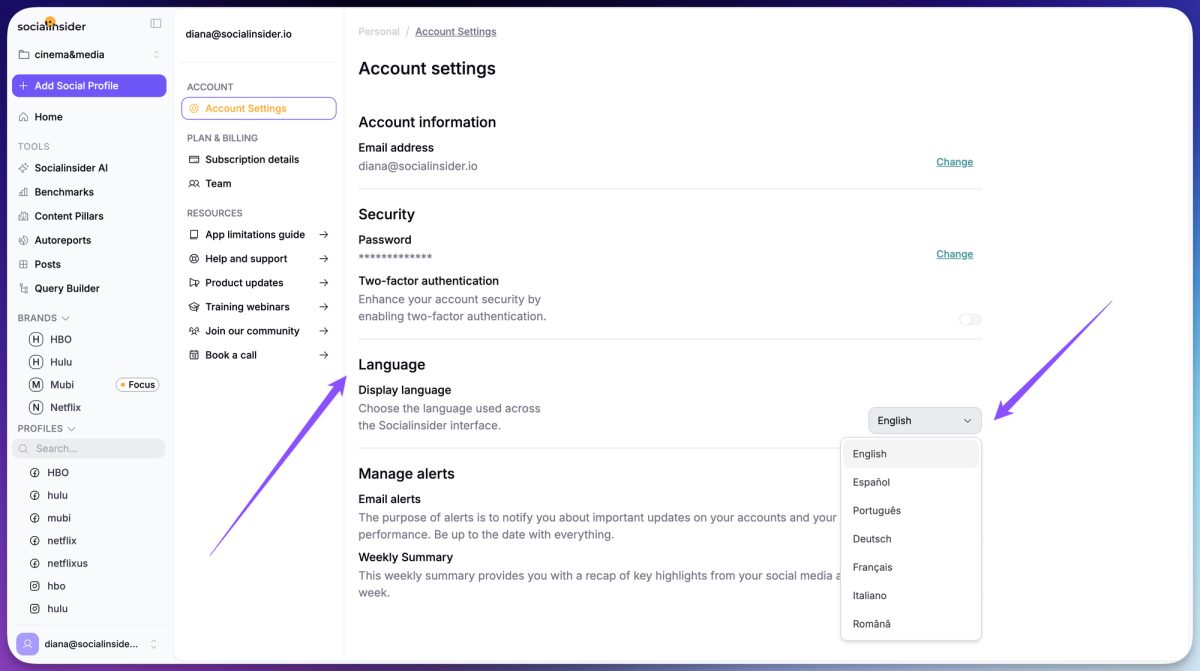
Previously, the Socialinsider dashboard was locked into English. That’s fine if your team grew up with English-first analytics tools, but it’s a barrier for international teams where daily work happens in Spanish, French, German, or Portuguese. The new update lets you switch the entire app interface to a language that feels more natural, right from your account settings.
This isn’t just cosmetic. When your dashboard speaks the same language as your team, onboarding gets faster. New hires don’t need to mentally translate every button and metric. Regional managers stop pinging you with “what does ‘CTR’ stand for again?” questions. And collaborators or clients who only occasionally log in no longer feel like they’re navigating a foreign city without a map.
The change is simple to execute: go to account settings, pick your preferred language, and the entire app refreshes. Want to switch back to English for a specific client call? It’s a two-second toggle. But for daily use, it’s a game changer for teams spread across markets. Think of it as the difference between reading a translated menu and actually understanding the chef’s specials.
Why Dashboard Language Matters for Your Team’s Workflow
Consider a social media agency managing accounts for a French retailer and a German automotive brand. The French client wants monthly reports in French; the German one expects German. Previously, you’d export everything in English, then manually translate the labels, adjust the wording, and hope nothing sounds robotic. That’s wasted time and a lot of copy-pasting.
Now, the reports follow your dashboard language. Set the app to French, and your exported reports come out in French. Switch to German, and the same report adapts. This doesn’t just save time; it improves quality. You’re no longer second-guessing whether a translated metric sounds natural or if a label got lost in translation. The report already speaks the audience’s language from the start.
Multi-Language Reports: Client-Ready Without the Manual Grunt Work
The second part of the update is the report generator itself. When you create a report, it automatically uses the same language as your dashboard. This might sound like a small feature, but it has significant operational implications. For international agencies or in-house teams working across regions, this eliminates one of the most tedious parts of reporting: the post-export translation shuffle.
Imagine you’re preparing a quarterly report for a stakeholder in Italy. Instead of exporting the PDF, opening a translation tool, carefully editing each section, rechecking labels like “Impressions” or “Reach,” and hoping the tone is consistent, you now start with a version that’s already in Italian. You can focus on the narrative, the insights, and the recommendations, not the vocabulary.
This is one of those updates that seems mundane at first but quietly saves hours every month. If you’ve ever manually translated a report and noticed that some terms don’t have perfect equivalents, you know the pain. “Engagement” in one language might feel too technical; “Interactions” in another might be too vague. Socialinsider’s localization team has done the heavy lifting so you don’t have to.
The Subtle Power of Localized Reporting
Beyond operational efficiency, there’s an emotional angle. When a client receives a report in their native language, it signals that you respect their time and context. It feels more tailored, more personal. It’s the difference between handing someone a signed contract and handing them one that’s been run through Google Translate. The trust factor is real.
For regional teams, it also fosters better internal collaboration. Instead of everyone defaulting to English, which might not be their strongest language, they can work in their preferred tongue. That leads to more thoughtful analysis, fewer misunderstandings, and a smoother workflow. The reports become more than just data; they become conversations your team actually wants to have.
How to Make the Most of Multilingual Features
Ready to dive in? Start by exploring the language options in your account settings. Test the switch with a dummy report to see how the localization handles industry-specific terms. Don’t be surprised if some metric names feel slightly different than expected; that’s a sign of thoughtful translation, not a bug.
Also, consider your audience. If you manage clients in multiple countries, you might want to set up separate workspaces with different language preferences. That way, you can generate a report for a German client without having to toggle the settings back and forth. It’s a small trick, but it keeps your workflow clean.
One thing to note: the reports follow the dashboard language, so if you switch languages mid-quarter, your historical reports will stay in the language you set at export time. That’s actually handy if you need to send an old report in its original format. No surprises there.
What This Means for the Future of Social Media Reporting
July’s update is a clear signal that Socialinsider is thinking about the global reality of social media management. Reporting isn’t a one-size-fits-all exercise; it’s a cultural conversation. By localizing both the app and the reports, the tool becomes more than a dashboard, it becomes a communication partner.
For teams that have struggled with language barriers, this is a small emotional win but a huge operational one. The next logical step might be auto-translating comments or AI-generated insights in multiple languages. But for now, this solid foundation makes the long-tail of reporting a lot less painful. And honestly, who doesn’t want to reclaim a few hours a month?