
From Email Threads to Emoji Reactions: A Unified Workspace
Managing social media with a team often feels like herding cats across a dozen different apps. Feedback trickles in through email, Slack, or even an Instagram DM, and you end up weaving a tangled web of red thread just to connect the dots. Buffer’s new real-time collaborative notes aim to cut that thread and tie everything together in one place.
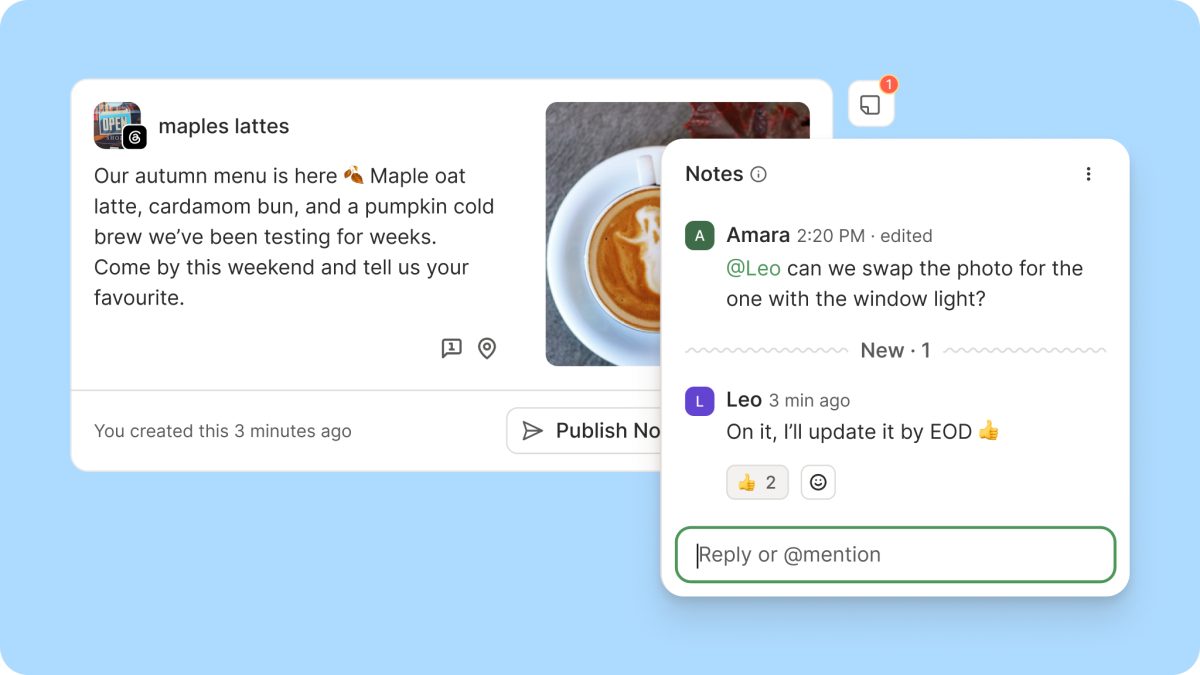
The feature, simply called Notes, lets you mention teammates, get notified instantly, and watch the conversation unfold live. It’s now available on every plan, including the Free tier, making it accessible to solo operators and large agencies alike. Think of it as a shared annotation layer for your social posts, where every piece of feedback lives right next to the content it refers to.
How Notes Works: Mentions, Live Updates, and Markdown
To loop in a colleague, just type @ and their name. They’ll receive an email notification right away, so feedback reaches them whether they’re in the app or not. When you’re mentioned or when someone adds a note to a post you created, you’ll know exactly which post needs attention and what’s needed from you.
The conversation happens in real time. New notes appear in the thread as they’re written, no refresh required. If you and a collaborator are both looking at the same post, you can hash it out on the spot and settle the question in one sitting. It’s like having a chat room attached to every update.
For longer feedback, Notes supports Markdown, so you can add links, lists, and headings to keep everything readable. And when a thumbs up covers it, you can react with an emoji instead of typing a reply. These small touches make the feature feel less like a formal review system and more like a natural extension of how teams already communicate.
Why Buffer Kept the Name ‘Notes’ (Despite a Heated Debate)
Behind the scenes, the team nearly renamed the feature to Discussions. When scoping the revamp, a debate kicked off in Slack about whether “Notes” still fit. With mentions and live replies, the feature now hosts full back-and-forth conversations, and some felt the old name undersold that. “Conversations” was also on the table, along with creative alternatives once they realized they’d already used most of the good collaborative words elsewhere in Buffer.
They landed on keeping Notes because it matches how people naturally talk. Saying “I left you a note” sounds like something a colleague would say, whereas “I started a discussion with you” does not. If Notes keeps growing into a bigger home for team conversations, the name may be revisited down the track. For now, it’s a reminder that sometimes the simplest label is the most human.
Built for Teams of Two or Twenty
For agencies juggling client feedback, Notes provides one place where approvals and revisions happen, with a record of every decision that anyone on the team can find later. No more digging through email chains or Slack threads to find out who approved what. For small businesses that recently added a second person to the social workload, Buffer becomes a shared space where you can plan and review posts together.
The Buffer team uses it internally too. Their remote team works across time zones and leans on Notes for handovers, leaving context on a post so the next person can pick up exactly where things left off. It’s a simple but powerful way to bridge the gap between shifts and locations.
The Road Ahead: Real-Time Collaboration as a Foundation
Real-time notes are just the groundwork for much of what Buffer is building next. If working on social as a team is central to how you use the platform, expect more collaboration features in the coming months. The company is clearly betting that social media management is not a solo sport, and the tools should reflect that.
To try it out, open any post in Buffer, add a note, and mention a teammate. If you don’t have teammates in Buffer yet, you can invite collaborators on the Team plan. The feature is available now on all plans, so even solo users can leave themselves context, like a reminder to update the copy before it goes out. It’s a small addition that could save a lot of red thread.