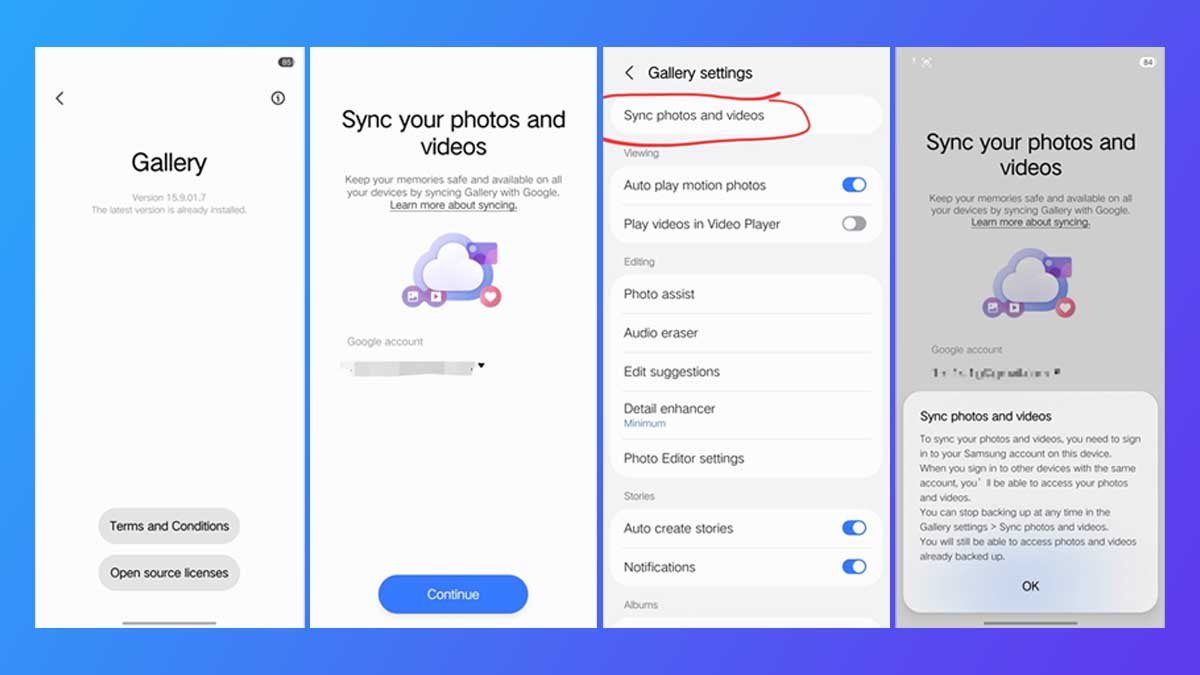

Samsung Galaxy users have been juggling cloud backups for years. The native Gallery app offered OneDrive, Google Photos sat on the sidelines, and users often ended up with duplicate libraries. That awkward dance is finally over. Samsung has begun rolling out direct Google Photos synchronization inside the stock Gallery app on compatible Galaxy phones and tablets.
What the New Sync Actually Does
The update brings automated two-way backup for both photos and videos. That means a picture snapped on your Galaxy S24 can appear in Google Photos within moments, and edits made in Google Photos can flow back to Samsung Gallery. It is not just a one-way dump into the cloud anymore. The system respects album-level controls too, so you can pick which albums sync and which stay local.
Shared cloud management is another quiet win. Families or teams using Google Photos shared libraries will find that Samsung Gallery now plays nicely with those shared spaces. No more manually downloading someone else’s vacation album just to see it in your phone’s default viewer.
Why does this matter right now? Because Samsung is preparing to sunset its direct Microsoft OneDrive integration. For years, OneDrive was the default cloud mirror for Samsung Gallery. That partnership is winding down, and Google Photos is stepping into the spotlight. If you have been ignoring those OneDrive sync reminders, you might want to start paying attention.
Which Devices Get the Update First
The rollout is staggered, as most Samsung updates are. Flagship Galaxy S and Z series devices are typically first in line, followed by recent Galaxy A models and select tablets. If you own a Galaxy S23, S24, Z Flip 5, Z Fold 5, or a Tab S9, chances are the update is either live or imminent. Older mid-range phones will see it later, depending on carrier and region.
How can you check? Open Samsung Gallery, tap the three-dot menu, and look for a Google Photos sync option under Settings. If it is not there yet, do not panic. Samsung’s staged rollouts can take weeks to reach every device. Sometimes a manual update through the Galaxy Store or Google Play triggers the new feature sooner.
The Technical Nuance Behind Two-Way Sync
Two-way synchronization sounds simple, but it is a logistical headache. Imagine two librarians organizing the same book collection in separate buildings. If one moves a book, the other must notice and rearrange accordingly. Samsung and Google now have that coordination working, at least for photos and videos. Metadata like timestamps, album names, and favorite flags are supposed to stay intact.
There are limits. RAW files, certain burst shots, and some professional editing sidecar files may not sync perfectly. Live Photos equivalent, Samsung’s Motion Photos, should work, but always verify. If you rely on specific folder structures for work, test the sync with a small album first. Cloud sync is never a substitute for a proper local backup, especially if you are a developer or photographer with irreplaceable assets.
Performance-wise, early reports suggest the sync runs quietly in the background. No battery drain horror stories yet. But give it a few days. Background uploads can chew through data if you are not on Wi-Fi, so check your sync settings if you have a limited plan.
What This Means for the Samsung and Google Ecosystem
Samsung and Google have been cozying up for years. From Wear OS to Assistant integration to RCS messaging, the two giants are acting less like rivals and more like business partners. This Gallery sync is another brick in that wall. It also puts pressure on Apple, which still locks iCloud Photos into its own silo. Android users get choice; iPhone users get a nudge toward one paid tier.
For developers, the implications are subtle but real. Apps that relied on Samsung’s OneDrive APIs for backup will need to adapt or fade. Google Photos APIs become more central to the Galaxy experience. If you build automation around Samsung Gallery, now is the time to revisit your integration points.
Should You Turn It On Right Away?
If you already pay for Google One storage, absolutely. The convenience of having every Galaxy shot automatically available across Android, iOS, and the web is hard to beat. If you are a OneDrive loyalist with terabytes of Microsoft storage, you might wait until the last minute. Just know that OneDrive sync inside Samsung Gallery will eventually stop working. The clock is ticking.
One more thing: privacy. Google Photos is not end-to-end encrypted by default. Your images are scanned for object recognition and other smart features. If that bothers you, keep sensitive albums synced only to a local SD card or a self-hosted solution. Samsung’s own Private Share is not a backup tool, but it can help for one-off sensitive transfers.
The Road Ahead for Galaxy Cloud Storage
Samsung has not announced whether it will offer its own first-party cloud backup to replace OneDrive. For now, Google Photos is the recommended path. That could change if Samsung decides to build a deeper tie with Google One or launch a hybrid service. Watch for announcements at the next Galaxy Unpacked event.
In the meantime, this update is a solid quality-of-life improvement. It removes friction, reduces duplicate libraries, and acknowledges that most Galaxy users already live in Google’s ecosystem. The days of choosing between Samsung Gallery and Google Photos are ending. They are learning to share the same shelf.
As cloud storage becomes less about brand loyalty and more about seamless access, the real winner here is the user. Just remember to check your sync settings before your next vacation. You do not want to discover that your beach photos only uploaded to the cloud after you ran out of local storage.