
When Buffer rolled out its latest Customer Experience Week, the goal was deceptively simple: ship 17 focused improvements in one week. The idea was to turn a handful of user‑reported pain points into tangible, friction‑free moments. The result? A richer, more intuitive product that feels less like a set of separate modules and more like a single, well‑tuned machine.
Expanding What Customers Can Do With Buffer
n8n Integration: Automate Content Creation
Automation enthusiasts often chain tools together with n8n, but Buffer previously had no direct hook into the workflow. A dedicated team built a bridge that lets n8n push ideas or posts straight into Buffer. Whether you’re pulling new items from a Notion table, turning form responses into social posts, or scheduling videos from Google Drive, the integration keeps Buffer out of the copy‑paste loop. The feature lives in Buffer’s API closed beta now, but plans to roll it out to the public once the public API opens.
Ghost Posts for Threads
Threads’ early documentation left creators in a grey area when they tried to repost or quote existing content. The Buffer squad responded by adding support for Threads’ “ghost post” format. Creators can now reshare or reference a Threads post directly from Buffer, matching the native platform experience. The team is already eyeing broader support beyond the web, ensuring the feature stays in sync with Threads’ evolving API.
Making Core Interactions Easier and Clearer
Analytics Cleanup and the Road to Insights
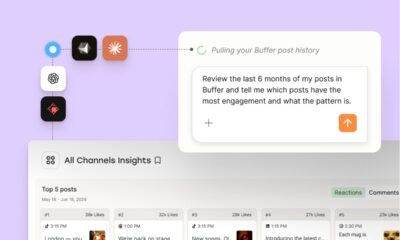
Over time, the analytics page accumulated stale metrics and confusing labels. By stripping out outdated Facebook data and clarifying the difference between Overview and Posts, the team reduced visual noise. At the same time, they prototyped a new Insights hub that promises actionable, platform‑specific guidance. The dual focus means users see a cleaner dashboard today while a more powerful analytics engine takes shape for tomorrow.
Real‑World Previews in the Composer
Previews are the last line of defense against formatting mishaps. Buffer’s redesign of LinkedIn, Instagram, TikTok, X, Threads, YouTube, Mastodon, and Bluesky previews now mirror what actually appears on each network. Users can click “See more” to expand long posts, scroll through carousel images with arrow keys, and spot issues before scheduling. The changes are subtle but vital; a misaligned image or missing caption can ruin a post’s impact.
Smart Threads Topic Dropdown
Frequent Threads posters often copy the same hashtag or topic. The new dropdown surfaces the five most recent topics, searchable in real time. A single click replaces a handful of keystrokes, turning a repetitive task into a quick glance. The feature lives behind a flag, ready for a full rollout once the team fine‑tunes its UX.
Proactive Instagram Guidance
Instagram’s quirks—personal vs. professional accounts, media limits, video errors—can trip even seasoned users. Buffer’s updated connection screen clarifies account types upfront, while composer alerts now use clearer language. During known video error spikes, a proactive prompt nudges users toward a stable connection, preventing frustration before it starts.
In‑App Changelog for Transparent Updates
Customers crave certainty about what’s changing. Buffer introduced a built‑in changelog system that lets the product team create, edit, and publish updates directly in the app. Each entry includes live previews, rich formatting, and optional cover images. Users receive a subtle notification, and the system tracks which updates have been seen, ensuring transparency without notification fatigue.
Reducing Support Friction Through Better Tools
AI‑Powered Diagnostics for Failed Posts
When a post fails, the default error message often feels opaque. The new AI‑driven tool parses the failure, surfaces likely causes, and offers next‑step guidance right inside the dashboard. For advocates, an internal dashboard pulls raw post data, speeding up triage. The result is fewer back‑and‑forth conversations and a smoother resolution path for users.
<h3Automated Customer Friction Analysis
Support logs hold a goldmine of insights, but they were previously buried in manual spreadsheets. An automated pipeline now extracts conversations, categorizes friction points, and logs them in a shared dashboard. By connecting these insights to broader customer context, teams can spot trends, prioritize fixes, and reduce recurring issues.
<h3Reinventing the Feedback Widget
Buffer’s original in‑app feedback form limited context and hampered follow‑up. The new widget lets users categorize feedback, write freely without character limits, and attach screenshots or videos. Feedback flows straight into a shared Google Sheet, making it easy for teams to review and iterate. The feature is almost ready for beta, but the groundwork is already paying dividends in how the product team listens.
Empowering Creators Beyond the Dashboard
<h3Linking Blog Content to the Help Center
Help Center articles often answer technical questions, but users also seek strategic guidance. By pairing high‑traffic help pages with relevant blog posts—covering planning, strategy, and analytics interpretation—Buffer gives users deeper resources without extra searching. The team built a Notion database of evergreen posts, automated UTM tracking, and a dashboard to monitor traffic, ensuring the link stays fresh.
<h3The Creator Playbook: Consistent Growth Made Simple
Rather than a buzz‑word crash course, Buffer’s new playbook walks creators through setting a clear focus, building sustainable rhythms, repurposing content, and responsibly using AI. The curriculum is designed to be revisited as goals shift, giving creators a repeatable system that grows with them.
<h3Template Library Campaign System
Running community or content campaigns from the Template Library used to require custom engineering each time. The new system introduces clear release states, a dedicated campaign database, and an explainer that walks teams through the full flow. When no campaign is active, less‑seen templates surface by default, giving the library wider visibility.
<h3AI‑Generated Alt Text for Accessibility
Missing alt text is a common accessibility oversight. Buffer’s AI assistant suggests descriptive alt text or recommends leaving it blank when an image is purely decorative. By integrating this feature as an optional enhancement, creators can improve inclusivity without extra effort.
Polishing Onboarding and Reactivation Moments
<h3Smoother Reactivation Experience
Returning users often face a barrage of banners and outdated announcements. Buffer trimmed pop‑ups, added expiry logic, and prioritized messages by relevance. A new in‑app changelog handling feature ensures that returning customers see only the updates that matter, allowing them to jump back into scheduling quickly.
<h3Refined Team Onboarding Emails
New team members previously struggled with permissions and next steps. The revamped email series mirrors free and trial onboarding flows, emphasizing habit formation and collaboration. Smart personalization and action‑based logic reduce redundant messages, while the Customer Advocacy team now sends a personal check‑in only when signals suggest a user might be stuck.
<h3Billing Quick Wins for a Calm Checkout
Billing hiccups can be stressful. Buffer now supports a dedicated billing email address, separating invoices from personal inboxes and routing them directly to finance teams. Error messages are clearer, offering guidance on what went wrong and how to fix it. While deeper Stripe integration is on the roadmap, these initial tweaks already reduce friction at the most vulnerable moments.
In a world where micro‑experiences define brand loyalty, Buffer’s Customer Experience Week proves that focused, cross‑functional sprints can deliver measurable impact. By tying every improvement back to real customer feedback and shipping them in a single week, the team has shown that great products are built not from a single breakthrough but from a cascade of thoughtful refinements. As Buffer continues to iterate, users can expect more of these intentional, customer‑centric changes—each one a small step toward a smoother, more powerful social‑media experience.